• English
  • हिन्दी (Hindi)
  • বাংলা (Bengali)
  • தமிழ் (Tamil)
  • తెలుగు (Telugu)
  • मराठी (Marathi)
  • ગુજરાતી (Gujarati)
  • ಕನ್ನಡ (Kannada)
  • മലയാളം (Malayalam)
  • ਪੰਜਾਬੀ (Punjabi)
  • ଓଡ଼ିଆ (Odia)
  • اردو (Urdu)
  • অসমীয়া (Assamese)
  • भोजपुरी (Bhojpuri)
  • मैथिली (Maithili)
  • डोगरी (Dogri)
  • कोंकणी (Konkani)
  • संस्कृत (Sanskrit)
  • سنڌي (Sindhi)
  • नेपाली (Nepali)
  • සිංහල (Sinhala)
  • Español (Spanish)
  • Français (French)
  • Deutsch (German)
  • Italiano (Italian)
  • Português (Portuguese)
  • Русский (Russian)
  • 日本語 (Japanese)
  • 한국어 (Korean)
  • 中文 简体 (Chinese Simplified)
  • 中文 繁體 (Chinese Traditional)
  • العربية (Arabic)
  • עברית (Hebrew)
  • فارسی (Persian)
  • Türkçe (Turkish)
  • Nederlands (Dutch)
  • Svenska (Swedish)
  • Norsk (Norwegian)
  • Dansk (Danish)
  • Suomi (Finnish)
  • Polski (Polish)
  • Čeština (Czech)
  • Slovenčina (Slovak)
  • Slovenščina (Slovenian)
  • Magyar (Hungarian)
  • Română (Romanian)
  • Български (Bulgarian)
  • Українська (Ukrainian)
  • Ελληνικά (Greek)
  • Hrvatski (Croatian)
  • Српски (Serbian)
  • ไทย (Thai)
  • Tiếng Việt (Vietnamese)
  • Bahasa Indonesia (Indonesian)
  • Bahasa Melayu (Malay)
  • Filipino
  • မြန်မာ (Burmese)
  • ខ្មែរ (Khmer)
  • ລາວ (Lao)
  • Монгол (Mongolian)
  • Қазақ (Kazakh)
  • Oʻzbek (Uzbek)
  • Кыргызча (Kyrgyz)
  • Тоҷикӣ (Tajik)
  • Türkmen (Turkmen)
  • Azərbaycan (Azerbaijani)
  • Հայերեն (Armenian)
  • ქართული (Georgian)
  • Беларуская (Belarusian)
  • Lietuvių (Lithuanian)
  • Latviešu (Latvian)
  • Eesti (Estonian)
  • Íslenska (Icelandic)
  • Gaeilge (Irish)
  • Gàidhlig (Scots Gaelic)
  • Cymraeg (Welsh)
  • Euskara (Basque)
  • Català (Catalan)
  • Galego (Galician)
  • Malti (Maltese)
  • Македонски (Macedonian)
  • Bosanski (Bosnian)
  • Shqip (Albanian)
  • Afrikaans
  • Kiswahili (Swahili)
  • አማርኛ (Amharic)
  • Hausa
  • Igbo
  • Yorùbá (Yoruba)
  • isiZulu (Zulu)
  • isiXhosa (Xhosa)
  • Sesotho
  • Sepedi
  • Shona
  • Soomaali (Somali)
  • Kinyarwanda
  • Chichewa
  • ትግርኛ (Tigrinya)
  • Oromoo (Oromo)
  • Xitsonga (Tsonga)
  • Luganda
  • Akan (Twi)
  • Lëtzebuergesch (Luxembourgish)
  • Frysk (Frisian)
  • Corsu (Corsican)
  • Esperanto
  • Latina (Latin)
  • Basa Jawa (Javanese)
  • Basa Sunda (Sundanese)
  • Cebuano
  • ʻŌlelo Hawaiʻi (Hawaiian)
  • Gagana Samoa (Samoan)
  • Te Reo Māori (Maori)
  • Kreyòl Ayisyen (Haitian Creole)
  • Runasimi (Quechua)
  • Aymar Aru (Aymara)
  • Avañeʼẽ (Guarani)
  • Kurdî (Kurdish)
  • کوردیی ناوەندی (Kurdish Sorani)
  • پښتو (Pashto)
  • ئۇيغۇرچە (Uyghur)
  • ދިވެހި (Dhivehi)
  • ייִדיש (Yiddish)
  • Krio
  • Mizo
  • Manipuri (Meiteilon)
  • Eʋegbe (Ewe)
  • Lingála
  • Bamanankan (Bambara)
  • Hmoob (Hmong)
  • Ilokano

Professional Prompt Writing Framework: How to Write Prompts Like an Engineer, Not a Beginner

Learn a proven 7-part prompt writing framework used by professionals — with a real example: building a full CRM system using AI.

Gagan Saxena

Writer & Blogger

Gagan Saxena

Writer & Blogger

Learn a proven 7-part prompt writing framework used by professionals — with a real example: building a full CRM system using AI.

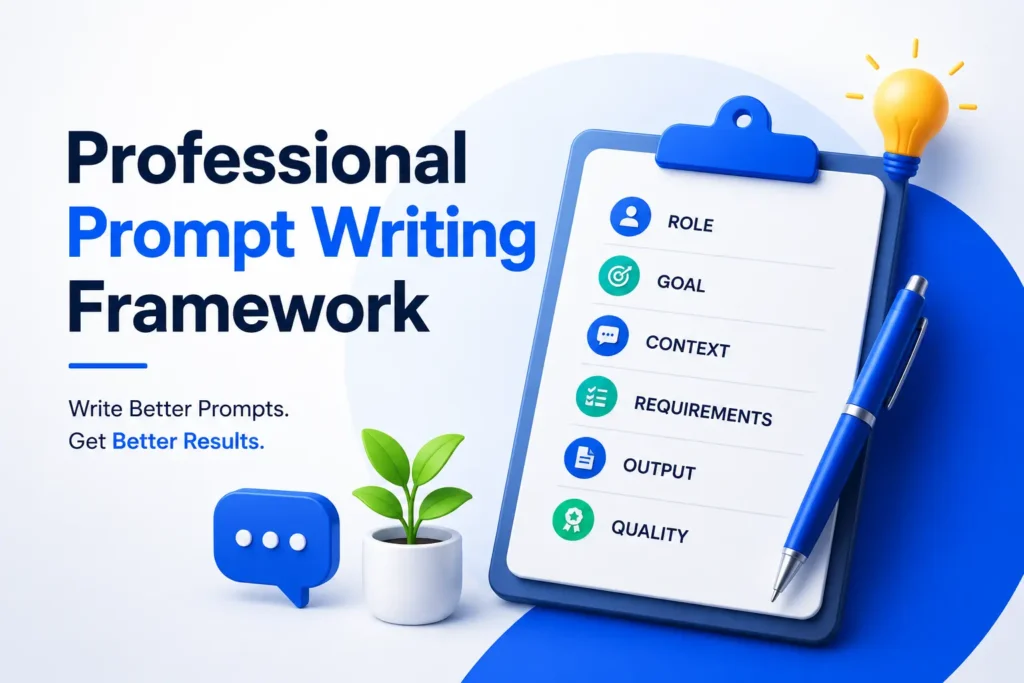
Professional Prompt Writing Framework
Previous Post

Why Most Prompts Fail

If you’ve ever typed something like build me a CRM app into an AI tool and gotten back a generic, half-finished response, you already know the problem. It’s not that the AI can’t help — it’s that the prompt didn’t give it enough to work with.

Most people write prompts the way they’d talk to a colleague who already knows the full context of the project. AI doesn’t have that context unless you hand it over. The fix isn’t writing longer prompts — it’s writing structured ones. That’s exactly what a professional prompt writing framework gives you: a repeatable formula that turns a vague request into a precise, production-ready brief.

The Framework

At its core, the framework breaks down into seven parts, in this order:

Role → Goal → Context → Input → Requirements → Output Format → Constraints

Think of it like briefing a new hire on their first day. You wouldn’t just say “go build the CRM.” You’d tell them who they’re acting as, what the actual objective is, what the business needs, what information they’re starting with, what the deliverable needs to include, how you want it presented, and what boundaries they need to work within. AI responds the same way — the more precisely you set that up, the better the output.

Breaking Down Each Component

Role — This sets the lens the AI operates through. Telling it to act as a “Senior Full-Stack Engineer, System Architect, and UI/UX Designer” pulls in a completely different quality of response than just asking it to “write some code.” The role shapes tone, depth, and technical judgment.

Goal — A single, clear sentence describing what you actually want built or solved. No ambiguity here — this is the north star for everything that follows.

Context — This is where you explain the why behind the project. Who’s going to use it? What problem does it solve? Context prevents the AI from making generic assumptions and instead tailors the response to your actual situation.

Input — The specific facts and parameters the AI needs to work with — business type, number of users, platform, target devices, authentication method, and so on. Think of this as the raw material for the project.

Requirements — The detailed feature list and technical expectations. This is usually the longest section, and it’s where you separate a superficial answer from a genuinely usable one.

Output Format — Instead of letting the AI decide how to structure its answer, you tell it exactly what order and format you want — project overview, architecture, database schema, API endpoints, and so on. This alone dramatically improves usability.

Constraints — The guardrails. Code quality standards, scalability expectations, complexity limits, and best practices the AI needs to respect throughout.

Real Example: Building a Small CRM With This Framework

Here’s the framework in action, applied to a real, practical use case: designing a lightweight CRM for a small business.

Role

You are a Senior Full-Stack Software Engineer, System Architect, and UI/UX Designer with expertise in building modern CRM applications.

Goal

Design and develop a lightweight, scalable, and user-friendly CRM system for a small business.

Context

The CRM will be used by a small sales team to manage customers, leads, follow-ups, quotations, tasks, and sales activities. It needs to be simple, fast, responsive, and easy to maintain.

Input

  • Business Type: IT Services Company
  • Users: 5–20
  • Platform: Web Application
  • Target Devices: Desktop, Tablet, Mobile
  • Authentication: Email & Password Login

Requirements

Core modules: User Authentication, Dashboard, Customer Management, Lead Management, Contact Management, Follow-up Management, Task Management, Notes, Quotations, Activity Timeline, Search & Filters, Notifications, User Profile, and Settings.

Technical expectations: Responsive UI, modern dashboard design, secure authentication, role-based permissions, REST API architecture, clean folder structure, scalable codebase, reusable components, validation, error handling, mobile-friendly layout, and fast loading performance.

Suggested stack:

  • Frontend: React, Next.js, Tailwind CSS
  • Backend: Node.js, Express.js
  • Database: PostgreSQL
  • Authentication: JWT
  • Deployment: Docker, Vercel, Railway

Output Format

The response should follow this exact order:

  1. Project Overview
  2. Features List
  3. System Architecture
  4. Database Schema
  5. API Endpoints
  6. Folder Structure
  7. UI Wireframe Suggestions
  8. Dashboard Layout
  9. Development Roadmap
  10. Recommended Technology Stack
  11. Security Best Practices
  12. Performance Optimization Tips
  13. Future Enhancements

Constraints

  • Write clean, production-ready code
  • Follow modern coding standards
  • Use reusable components
  • Keep the UI minimal and professional
  • Avoid unnecessary complexity
  • Ensure scalability and maintainability
  • Add comments where necessary
  • Follow industry best practices

Final Instruction

Think step by step before generating the solution. Explain your decisions where appropriate, and ensure the architecture is suitable for a real-world production application.

Notice how different this feels from “build me a CRM.” Every ambiguity has been closed off before the AI even starts generating.

Why This Framework Actually Works

The reason this structure performs so well comes down to one simple idea: AI models generate better output when the problem space is fully defined. Every gap you leave in a prompt gets filled in by the model’s own assumptions — and those assumptions are rarely tailored to your actual project.

By explicitly defining the role, the AI adopts the right expertise lens. By setting context and input, it stops guessing at your business situation. By listing requirements up front, nothing critical gets skipped. And by dictating the output format, you get something usable immediately, instead of a wall of text you have to reorganize yourself.

This isn’t just useful for CRMs — the same seven-part structure works for building a mobile app, drafting a business plan, writing a marketing strategy, or generating a technical architecture document.

How to Apply It to Your Own Projects

Next time you’re about to prompt an AI tool for something substantial, run through the framework before you hit enter:

  1. Who should the AI be for this task?
  2. What’s the actual goal, in one sentence?
  3. What background does the AI need to understand the situation?
  4. What specific inputs or constraints define this project?
  5. What exactly needs to be included in the solution?
  6. How do you want the answer structured?
  7. What rules or standards should the output follow?

Answer those seven questions before you write your prompt, and you’ll notice the quality gap immediately — less back-and-forth, fewer generic answers, and a first response that’s actually close to what you needed.


FAQs

It's a structured formula — Role, Goal, Context, Input, Requirements, Output Format, and Constraints — used to write clear, detailed AI prompts that produce accurate, production-ready results instead of vague, generic answers.

Because it removes ambiguity. Instead of letting the AI guess at your context, requirements, and expected format, you define all of it up front — which leads to far more usable, precise output on the first try.

es. The same seven-part structure works for marketing strategies, business plans, content creation, research briefs, and virtually any task where you need a detailed, structured AI response.

For simple tasks, no — you can skip sections that don't apply. But for anything complex or production-oriented, like building an application or a business document, including all seven sections consistently produces the strongest results.

As long as it needs to be to remove ambiguity — usually several paragraphs to a full page for complex projects. Length isn't the goal; completeness is.

Leave a Reply

Your email address will not be published. Required fields are marked *

Previous Post

Subscribe to Our Newsletter

    © 2026 FindBrief. All Rights Reserved.

    Which language are you reading?

    Apni pasandida bhasha chunein

    • English
    • हिन्दी (Hindi)
    • বাংলা (Bengali)
    • தமிழ் (Tamil)
    • తెలుగు (Telugu)
    • मराठी (Marathi)
    • ગુજરાતી (Gujarati)
    • ಕನ್ನಡ (Kannada)
    • മലയാളം (Malayalam)
    • ਪੰਜਾਬੀ (Punjabi)
    • ଓଡ଼ିଆ (Odia)
    • اردو (Urdu)
    • অসমীয়া (Assamese)
    • भोजपुरी (Bhojpuri)
    • मैथिली (Maithili)
    • डोगरी (Dogri)
    • कोंकणी (Konkani)
    • संस्कृत (Sanskrit)
    • سنڌي (Sindhi)
    • नेपाली (Nepali)
    • සිංහල (Sinhala)
    • Español (Spanish)
    • Français (French)
    • Deutsch (German)
    • Italiano (Italian)
    • Português (Portuguese)
    • Русский (Russian)
    • 日本語 (Japanese)
    • 한국어 (Korean)
    • 中文 简体 (Chinese Simplified)
    • 中文 繁體 (Chinese Traditional)
    • العربية (Arabic)
    • עברית (Hebrew)
    • فارسی (Persian)
    • Türkçe (Turkish)
    • Nederlands (Dutch)
    • Svenska (Swedish)
    • Norsk (Norwegian)
    • Dansk (Danish)
    • Suomi (Finnish)
    • Polski (Polish)
    • Čeština (Czech)
    • Slovenčina (Slovak)
    • Slovenščina (Slovenian)
    • Magyar (Hungarian)
    • Română (Romanian)
    • Български (Bulgarian)
    • Українська (Ukrainian)
    • Ελληνικά (Greek)
    • Hrvatski (Croatian)
    • Српски (Serbian)
    • ไทย (Thai)
    • Tiếng Việt (Vietnamese)
    • Bahasa Indonesia (Indonesian)
    • Bahasa Melayu (Malay)
    • Filipino
    • မြန်မာ (Burmese)
    • ខ្មែរ (Khmer)
    • ລາວ (Lao)
    • Монгол (Mongolian)
    • Қазақ (Kazakh)
    • Oʻzbek (Uzbek)
    • Кыргызча (Kyrgyz)
    • Тоҷикӣ (Tajik)
    • Türkmen (Turkmen)
    • Azərbaycan (Azerbaijani)
    • Հայերեն (Armenian)
    • ქართული (Georgian)
    • Беларуская (Belarusian)
    • Lietuvių (Lithuanian)
    • Latviešu (Latvian)
    • Eesti (Estonian)
    • Íslenska (Icelandic)
    • Gaeilge (Irish)
    • Gàidhlig (Scots Gaelic)
    • Cymraeg (Welsh)
    • Euskara (Basque)
    • Català (Catalan)
    • Galego (Galician)
    • Malti (Maltese)
    • Македонски (Macedonian)
    • Bosanski (Bosnian)
    • Shqip (Albanian)
    • Afrikaans
    • Kiswahili (Swahili)
    • አማርኛ (Amharic)
    • Hausa
    • Igbo
    • Yorùbá (Yoruba)
    • isiZulu (Zulu)
    • isiXhosa (Xhosa)
    • Sesotho
    • Sepedi
    • Shona
    • Soomaali (Somali)
    • Kinyarwanda
    • Chichewa
    • ትግርኛ (Tigrinya)
    • Oromoo (Oromo)
    • Xitsonga (Tsonga)
    • Luganda
    • Akan (Twi)
    • Lëtzebuergesch (Luxembourgish)
    • Frysk (Frisian)
    • Corsu (Corsican)
    • Esperanto
    • Latina (Latin)
    • Basa Jawa (Javanese)
    • Basa Sunda (Sundanese)
    • Cebuano
    • ʻŌlelo Hawaiʻi (Hawaiian)
    • Gagana Samoa (Samoan)
    • Te Reo Māori (Maori)
    • Kreyòl Ayisyen (Haitian Creole)
    • Runasimi (Quechua)
    • Aymar Aru (Aymara)
    • Avañeʼẽ (Guarani)
    • Kurdî (Kurdish)
    • کوردیی ناوەندی (Kurdish Sorani)
    • پښتو (Pashto)
    • ئۇيغۇرچە (Uyghur)
    • ދިވެހި (Dhivehi)
    • ייִדיש (Yiddish)
    • Krio
    • Mizo
    • Manipuri (Meiteilon)
    • Eʋegbe (Ewe)
    • Lingála
    • Bamanankan (Bambara)
    • Hmoob (Hmong)
    • Ilokano
    Scroll to Top